Free 186 More Best Homemade Tools eBook:  
New: 300+ fresh build posts/day from 275 forums → BuildThreads.com

User Tag List

Page 1 of 2 1 2 LastLast
Results 1 to 10 of 13

Thread: Touch screen stylus

Hybrid View

  1. #1
    Supporting Member mklotz's Avatar
    Join Date
    Aug 2015
    Location
    LA, CA, USA
    Posts
    3,720
    Thanks
    376
    Thanked 7,192 Times in 2,348 Posts

    mklotz's Tools

    Touch screen stylus

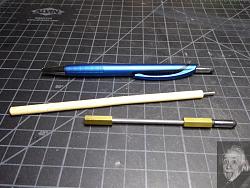
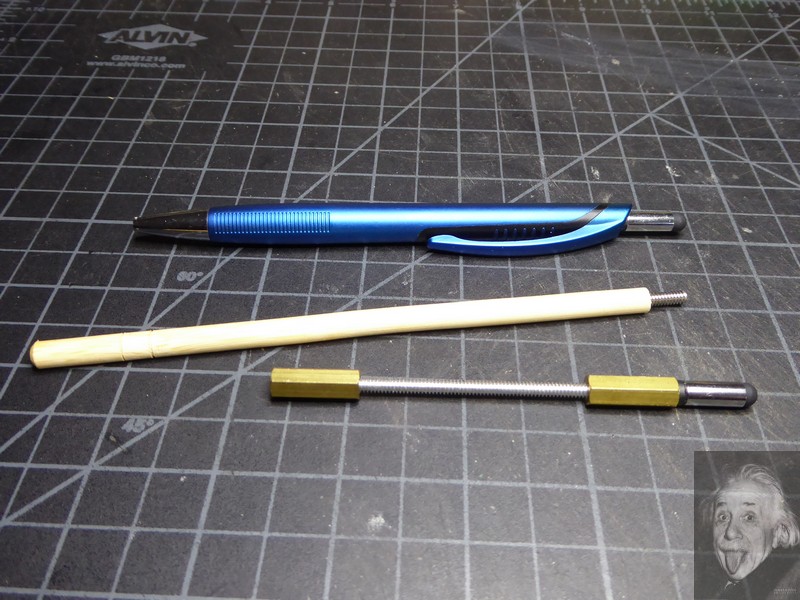
    It's much easier to type on the touchscreen on my camera if I use a stylus. I had been using the one on the end of the blue pen in the photo but I wanted a shorter one to keep in the camera bag. I decided to sacrifice one of the pens and attach it to a short stalk.

    A piece of bamboo chopstick was fitted with a 6-32 screw and the stylus tip attached. IT DIDN'T WORK; COULDN'T TYPE A SINGLE LETTER.

    A little experimentation showed that it would work if I touched the metal sleeve that housed the rubber stylus tip. Apparently these capacitance touch screens need the capacitance of a human body to work.

    Then I assembled the stylus "handle" shown from bits found in my personal hardware store. It works just fine. (I may shorten it even more.)

    Now, here's what I don't understand... Presumably, the chopstick handle didn't work because the wood is non-conductive. However, the blue pen works fine and the plastic body is non-conductive (I checked with an ohmmeter), nor was I touching the metal tip or pocket clip while using it.

    To further confound the situation, the metal sleeve that holds the rubber tip has a (presumably non-conductive) plastic insert into which the attachment screw(s) thread; there is no metal-to-metal connection between the sleeve and handle.

    Touch screen stylus-p1010464.jpg
    ---
    Regards, Marv

    Smart phones are to people what laser pointers are to cats
    Homo sapiens is a goal, not a definition

  2. The Following User Says Thank You to mklotz For This Useful Post:

    nova_robotics (Feb 6, 2023)

  3. #2
    Supporting Member BuffaloJohn's Avatar
    Join Date
    Aug 2019
    Location
    Oregon, USA
    Posts
    1,310
    Thanks
    502
    Thanked 783 Times in 464 Posts

    BuffaloJohn's Tools
    Perhaps it a charge that is doing the trick. While plastic is an insulator, it can hold a charge, whereas wood won't hold a charge...

  4. #3
    WmRMeyers's Avatar
    Join Date
    Dec 2014
    Posts
    885
    Thanks
    405
    Thanked 426 Times in 288 Posts

    WmRMeyers's Tools
    Quote Originally Posted by mklotz View Post
    It's much easier to type on the touchscreen on my camera if I use a stylus. I had been using the one on the end of the blue pen in the photo but I wanted a shorter one to keep in the camera bag. I decided to sacrifice one of the pens and attach it to a short stalk.

    A piece of bamboo chopstick was fitted with a 6-32 screw and the stylus tip attached. IT DIDN'T WORK; COULDN'T TYPE A SINGLE LETTER.

    A little experimentation showed that it would work if I touched the metal sleeve that housed the rubber stylus tip. Apparently these capacitance touch screens need the capacitance of a human body to work.

    Then I assembled the stylus "handle" shown from bits found in my personal hardware store. It works just fine. (I may shorten it even more.)

    Now, here's what I don't understand... Presumably, the chopstick handle didn't work because the wood is non-conductive. However, the blue pen works fine and the plastic body is non-conductive (I checked with an ohmmeter), nor was I touching the metal tip or pocket clip while using it.

    To further confound the situation, the metal sleeve that holds the rubber tip has a (presumably non-conductive) plastic insert into which the attachment screw(s) thread; there is no metal-to-metal connection between the sleeve and handle.
    Click image for larger version. 

Name:	P1010464.jpg 
Views:	229 
Size:	165.9 KB 
ID:	44784
    Marv, what is a capacitor? Two plates with a dielectric material between them, and a charge on the plates, right? You're essentially playing with the characteristics of the dielectric material in your "capacitor." Maybe the bamboo is too good an insulator, or maybe it has too much leakage. Do you have a meter with a capacitance checker? You might be able to measure the differences.

    Bill

  5. #4
    Supporting Member
    Join Date
    Sep 2018
    Posts
    2,921
    Thanks
    13,819
    Thanked 1,779 Times in 1,001 Posts

    nova_robotics's Tools
    Some slightly older phones used the capacitance of your finger to the screen, the conductivity of your body, then the capacitance of your palm to the back cover of the phone. They rely on one hand holding the phone case while your other hand touches the screen. A protective phone case insulating your body from direct galvanic contact still works because that's just additional dielectric on the second series capacitor. Put an iPhone 8 down on a wood table and try to touch the screen with your finger. Won't work. It needs to complete that right-hand left-hand series circuit.

    Newer phones use a different strategy. I'm not sure if they're using adjacent ITO plates in the screen as essentially alternating positives and negatives (I suspect this is how they're accomplishing it) making the wet tip of your finger meat a plate in the middle of two series capacitors. This eliminates the need to touch the back of the phone. But this introduces a new problem, this needs the "squishiness" of your of finger to cover multiple adjacent pads of the ITO matrix. So a tiny metal point probably won't work if your touchscreen uses this strategy.

    But either way there can be wildly varying capacitance values and the screen will function perfectly fine. That's why sometimes you don't even have to touch the surface of your screen. Just position your finger with a millimeter or so gap above the screen and it will still register a touch. I would get one of those conductive rubber pads from the inside of an old remote control and run a small wire/rod from the back to somewhere your hand will touch it. That should work for any design of touchscreen, and it won't damage your screen.

  6. The Following User Says Thank You to nova_robotics For This Useful Post:

    Toolmaker51 (Feb 7, 2023)

  7. #5
    WmRMeyers's Avatar
    Join Date
    Dec 2014
    Posts
    885
    Thanks
    405
    Thanked 426 Times in 288 Posts

    WmRMeyers's Tools
    Quote Originally Posted by nova_robotics View Post
    Some slightly older phones used the capacitance of your finger to the screen, the conductivity of your body, then the capacitance of your palm to the back cover of the phone. They rely on one hand holding the phone case while your other hand touches the screen. A protective phone case insulating your body from direct galvanic contact still works because that's just additional dielectric on the second series capacitor. Put an iPhone 8 down on a wood table and try to touch the screen with your finger. Won't work. It needs to complete that right-hand left-hand series circuit.

    Newer phones use a different strategy. I'm not sure if they're using adjacent ITO plates in the screen as essentially alternating positives and negatives (I suspect this is how they're accomplishing it) making the wet tip of your finger meat a plate in the middle of two series capacitors. This eliminates the need to touch the back of the phone. But this introduces a new problem, this needs the "squishiness" of your of finger to cover multiple adjacent pads of the ITO matrix. So a tiny metal point probably won't work if your touchscreen uses this strategy.

    But either way there can be wildly varying capacitance values and the screen will function perfectly fine. That's why sometimes you don't even have to touch the surface of your screen. Just position your finger with a millimeter or so gap above the screen and it will still register a touch. I would get one of those conductive rubber pads from the inside of an old remote control and run a small wire/rod from the back to somewhere your hand will touch it. That should work for any design of touchscreen, and it won't damage your screen.
    There are older screens that use resistance. Dell Axim palmtop computers, and the old Sharp Personal Organizers, among others. I bet finding them, and data on them is about impossible now. The capacitance screens seem more reliable to me, but you can get a variety of capacitive styli at about any Dollar Tree in the US. Might be better to find one that works, and add a handle that gives you the length you want, if necessary. Though if you're having fun fiddling with it, there's no harm in that, either. When I'm using a stylus, I'm usually too busy to want to mess with them, but I've got a couple of favorites, though I can hardly ever find them.

    Bill

  8. The Following User Says Thank You to WmRMeyers For This Useful Post:

    nova_robotics (Feb 7, 2023)

  9. #6
    Supporting Member
    Join Date
    Sep 2018
    Posts
    2,921
    Thanks
    13,819
    Thanked 1,779 Times in 1,001 Posts

    nova_robotics's Tools
    Quote Originally Posted by WmRMeyers View Post
    There are older screens that use resistance.
    Yup definitely. But resistive touchscreens are a different critter entirely. I was talking about competing strategies used in capacitive touchscreens. Within the umbrella of capacitive touchscreens there are Surface Capacitance and Projected Capacitance screens, and Projected Capacitance screens can be broken down even further to Mutual Capacitance and Self Capacitance. And I think there are even more sub-categories. I believe there are also devices which apply an oscillating signal to the ITO pads to detect capacitive coupling, and others measure changes in static voltages. It's very confusing but based on my rudimentary understanding I had figured that some screens would couple better than others with a stylus. But I don't know what I'm talking about.

  10. #7
    WmRMeyers's Avatar
    Join Date
    Dec 2014
    Posts
    885
    Thanks
    405
    Thanked 426 Times in 288 Posts

    WmRMeyers's Tools
    Quote Originally Posted by nova_robotics View Post
    Yup definitely. But resistive touchscreens are a different critter entirely. I was talking about competing strategies used in capacitive touchscreens. Within the umbrella of capacitive touchscreens there are Surface Capacitance and Projected Capacitance screens, and Projected Capacitance screens can be broken down even further to Mutual Capacitance and Self Capacitance. And I think there are even more sub-categories. I believe there are also devices which apply an oscillating signal to the ITO pads to detect capacitive coupling, and others measure changes in static voltages. It's very confusing but based on my rudimentary understanding I had figured that some screens would couple better than others with a stylus. But I don't know what I'm talking about.
    Once upon a time, I was a competent electronics technician. No wizard, like some, but I could fix broken satellite equipment with the best of them. And trained several of them myself. I'm not quite to the point where I regard it as black magic, but I may be getting there. As far as programming the equipment, my salad days for that were long ago. Designing equipment? Nope. Though I could give the folks who do a few pointers based on my skills as a maintainer. "Do NOT put the controls so close together that you will activate one control while trying to activate another." "Leave room for the maintainer to put his or her hands inside so they can work on the machine." "DO NOT expect all maintainers to have size XXXS hands." Mine happen to be XL, and I've worked with folks who made my hands look small.

    Bill

  11. #8
    Supporting Member
    Join Date
    Feb 2016
    Posts
    68
    Thanks
    186
    Thanked 44 Times in 28 Posts
    Marv, that’s very interesting.

    When you mention capacitance of the human body, it made me wonder about the capacitance of the alternate form you built, with layers of conductors and non-conductors as in a capacitor. I’m no physicist or engineer, so this may be way off base.

    Anyway, nicely done!

  12. #9
    Supporting Member Toolmaker51's Avatar
    Join Date
    Feb 2016
    Location
    Midwest USA
    Posts
    5,355
    Thanks
    7,074
    Thanked 3,569 Times in 2,209 Posts

    Toolmaker51's Tools
    I don't have the capacity to wax eloquent on capacitors or the ultra sensitive touchscreens. I do know wood has little tendency to hold a static charge, where many thermo-plastics readily do.
    My stylus fell subject to gravity, down stack of 39 panels of floor grating. Nothing seems able to retrieve it. Of course, the stacking not so perfect for a suitable instrument wind it's way to the bottom..... So now I use a ink pen, the other end fitted with touch pad, and don't have to hold device.

    The second most remarkable feature of Marv's post, this may be first time he's gone full-on upper case demonstrating such adamant revelations.
    Sincerely,
    Toolmaker51
    ...we'll learn more by wandering than searching...

  13. #10
    CanBeDone's Avatar
    Join Date
    Oct 2019
    Posts
    43
    Thanks
    0
    Thanked 38 Times in 18 Posts
    Marv, whether you have a capacitive or resistive coupling between pen and camera screen, you need a voltage, and a current to flow, to embody a signal. The magnitude of the current is determined by the voltage you create by moving the tip across the screen (i.e. electrode 1 of the camera), and the resistance between electrode 2 (either the body of the camera, or another electrode built into the screen). Where does the voltage come from, if there is no battery? I am sure a physicist like you does know about influence, i.e. the separation of electric charge due to moving two materials (which may be conductors or insulators) close to each other. And once you realize it is influence that creates the voltage, you'll know that voltage will be in the thousands of volts. And since the current will need to be in the micro- or milliampere range, so that the electronics inside the camera is protected from overvoltage, there has to be resistance in the megohm range. And megohms cannot be reliably measured with an ordinary ohmmeter. You need a megger (a mega ohm meter), i.e. a device that injects thousands of volts into the circuit-to-be-measured to get a signal of suitable size, and not the roughly 10 volts of an ordinary ohmmeter.
    And look at the color of your pen: it's metallic, and that means the plastic contains some aluminum powder, and its resistance is no longer in the teraohm range of pure ABS or polystyrene, or whatever the body of the pen is made of. And your chopstick, being wood, will contain some salts, and thus will have resistance in the, maybe, gigaohm range, too much to give a meaningful signal but not enough to make wood a trustworthy insulator. Have a look at e.g. https://woodwoodland.com/does-wood-conduct-electricity/ for a table of resistivity of some materials.
    It's not difficult to understand once you start seeing your device in terms of SIGNAL=CHANGING VOLTAGE and the consequences this has for the upper and lower limits of current required to affect electronic circuits.

  14. The Following 2 Users Say Thank You to CanBeDone For This Useful Post:

    Toolmaker51 (Feb 7, 2023), WmRMeyers (Feb 9, 2023)

Thread Information

Users Browsing this Thread

There are currently 1 users browsing this thread. (0 members and 1 guests)

Bookmarks

Posting Permissions

  • You may not post new threads
  • You may not post replies
  • You may not post attachments
  • You may not edit your posts
  •