
 LinkBack URL
 About LinkBacks


Hi John:
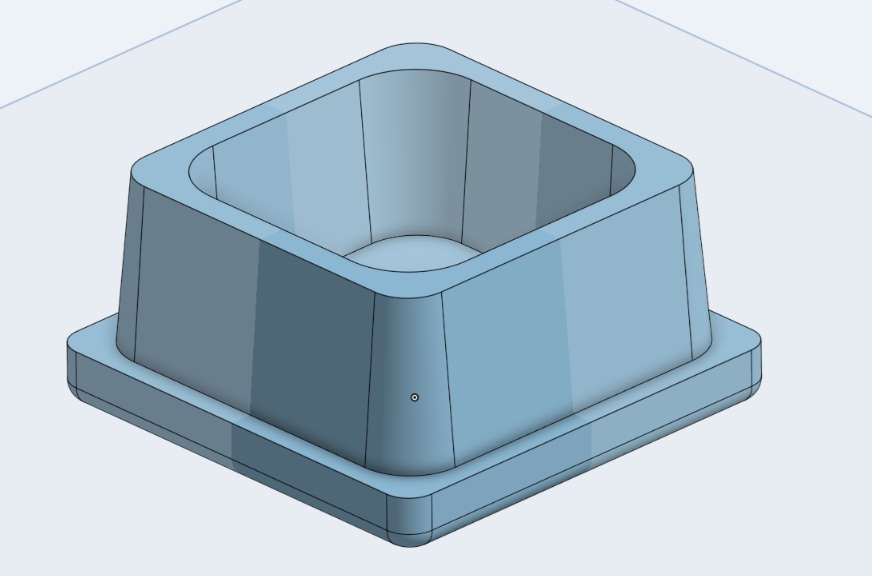
It isn't hard. The only challenge for the printer is the 0.230" radius on the top, but some printers might be OK with it. Otherwise you could add the radius after printing the rest.
I use a free 3D modeller called OnShape that is similar to SolidWorks. Here are the steps I would take:
1) On the top plane draw a 2" square and extrude it to 0.25"
2) On top the square draw second square 1.8" and extrude it 0.75"
3) On top of the 1.8" square draw a 1/3" square and remove material to 0.7"? deep
4) Put a 0.25" radius on the eight corners
5) Add a 5° draft to the sides and corners
6) Put an 0.125" radius on the top corners
7) Put the 0.23" radius on the very top
It took me about 15 minutes to model, here is a link:
https://cad.onshape.com/documents/00...c98eba1908ab6d
Good luck, Carl.


 Reply With Quote

Bookmarks