Free 186 More Best Homemade Tools eBook:  
New: 300+ fresh build posts/day from 275 forums → BuildThreads.com

User Tag List

Page 1 of 3 1 2 3 LastLast
Results 1 to 10 of 28

Thread: Everyone needs a hardness tester.

Hybrid View

  1. #1
    Supporting Member tonyfoale's Avatar
    Join Date
    Nov 2016
    Location
    Spain
    Posts
    1,821
    Thanks
    834
    Thanked 3,242 Times in 910 Posts

    tonyfoale's Tools

    Everyone needs a hardness tester.

    I needed a hardness tester to test the hardness of cylinder heads and other engine components.
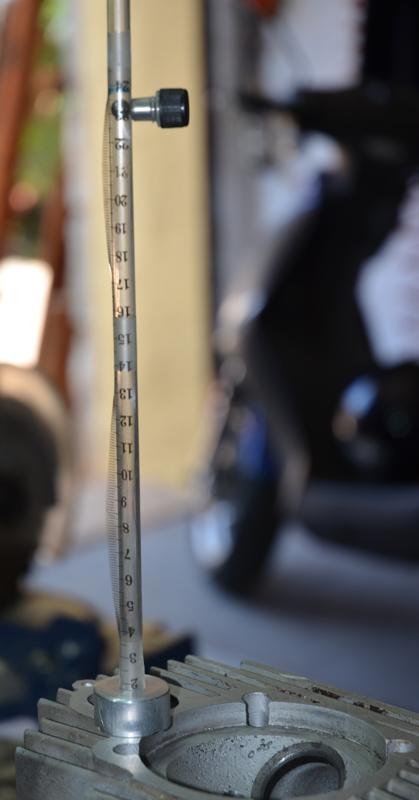
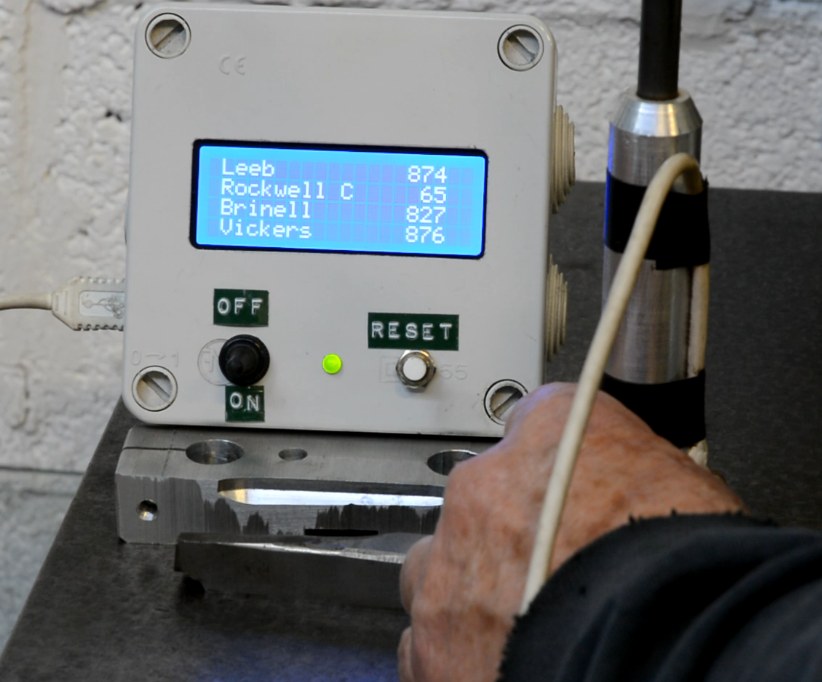
    Years ago, sales reps would give garages and reconditioning shops a simple tester based on the Shore rebound principle. I made a copy of those for myself but I was disappointed with it because it was too fast to get repeatable results by visual observation. I then made a more sophisticated version which replaced my poor old man's observational skills with electronics and an Arduino.
    Then when preparing this post I saw how the use of a camera or smart phone could turn the original version into a really useful instrument. This multi-disciplinary post describes both versions. There is mechanical, electronic, programming and simple maths content but the original version only uses the mechanical, so do not be frightened off if electrons bring you out in a rash.
    Everyone needs a hardness tester.-hardnesstester.jpg Everyone needs a hardness tester.-tf01.jpg Click thumbnails for full size.

    These really need to be seen in action so I prepared two videos, part 1 describes the mechanical stuff and discusses hardness testing in general and part 2 looks at the electronics (very simple).

    However, video is not the best format in which to present schematics and programmes so I have also prepared a PDF with file. A PDF is not the best medium from which to lift the text of an Arduino programme so I also include that in this post directly, just copy and paste into your Arduino IDE.

    Videos:

    and


    Watch part 1 before part 2.

    Here is the PDF: https://diqn32j8nouaz.cloudfront.net...ess_tester.pdf

    ----------------------------------------------------
    Here is the programme to upload to an Arduino Nano or other compatible micro.

    #include <Wire.h> // Communications library
    #include <LiquidCrystal_I2C.h> // Library for printing to display

    LiquidCrystal_I2C lcd(0x27,20,4); // set the LCD address to 0x27 and a 20 x 4 display.

    // Change these two constants to suit your own hardware implementation.

    float s = 0.0049;
    // Vertical constant distance between sensors in m.

    float twoas = 0.1813;
    // Constant 2as is used to correct velocity using 9.25 mm final drop after mean sensing.

    void setup(){
    lcd.init();
    lcd.backlight();
    lcd.clear();
    lcd.setCursor(1,0);
    lcd.print("Leeb");
    lcd.setCursor(1,1);
    lcd.print("Rockwell C");
    lcd.setCursor(1,2);
    lcd.print("Brinell");
    lcd.setCursor(1,3);
    lcd.print("Vickers");

    pinMode(2, INPUT_PULLUP);
    pinMode(3, INPUT_PULLUP);

    myCalc();
    }

    unsigned long t[4], dt1, dt2;
    float v1, v2 ;
    uint16_t leeb, Rc, Brin, Vick;

    void myCalc() {
    // Get timings. This works better than using interrupts.
    while (! digitalRead(2)) { }
    t[0] = micros();
    while (! digitalRead(3)) { }
    t[1] = micros();
    while (digitalRead(3)) { }
    while (! digitalRead(3)) { }
    t[2] = micros();
    while (! digitalRead(2)) { }
    t[3] = micros();

    // Calculate time intervals
    dt1 = t[1] - t[0];
    dt2 = t[3] - t[2];

    // Calculate and adjust drop & rebound velocities
    v1 = (1000000*s)/dt1; v1 = sqrt(v1*v1 + twoas);
    v2 = (1000000*s)/dt2; v2 = sqrt(v2*v2 + twoas);

    // Calculate leeb hardness value and convert to other scales
    leeb = (1000 * v2)/v1; // Leeb value
    Rc = -0.000112211 * leeb*leeb + 0.2808769 * leeb - 93.83636; // HRC
    Brin = 0.00237066 * leeb*leeb -1.646908 * leeb + 455.7088;
    // Brinell
    Vick = 0.00264169 * leeb*leeb -1.900271 * leeb + 519.8346;
    // Vickers

    myDisplay();
    }

    void myDisplay() {
    if (leeb < 1000 && leeb > 0) {
    if (leeb >= 950) {
    lcd.setCursor(0,1); lcd.print("**High value** ");
    }
    else if (leeb < 400) {
    lcd.setCursor(0,1); lcd.print("** Low value ** ");
    }
    if (leeb >= 400) { //Value when Rc = 0
    lcd.setCursor(16, 1); lcd.print(Rc);
    }
    lcd.setCursor(15, 0); lcd.print(leeb);
    lcd.setCursor(15, 2); lcd.print(Brin);
    lcd.setCursor(15, 3); lcd.print(Vick);
    }
    else { // When !(leeb < 1000 && leeb > 0)
    lcd.clear();
    lcd.setCursor(0, 1); lcd.print("***** WARNING *****");
    lcd.setCursor(0, 2); lcd.print("Value out of range.");
    }
    }

    void loop() {
    }

  2. The Following 18 Users Say Thank You to tonyfoale For This Useful Post:

    Claudio HG (Feb 13, 2021), DIYer (Feb 12, 2021), DIYSwede (Feb 9, 2021), emu roo (Jun 13, 2025), Gar (Feb 9, 2021), Jeffie (Feb 9, 2021), johncg (Feb 10, 2021), Jon (Feb 9, 2021), ngangst (Feb 23, 2021), NortonDommi (Feb 14, 2021), olderdan (Feb 10, 2021), Paul Jones (Feb 10, 2021), sacco1 (Feb 9, 2021), Saltfever (Apr 28, 2023), Tonyg (Feb 10, 2021), Toolmaker51 (Feb 9, 2021), tooly (Feb 10, 2021), yvonf (Feb 10, 2021)

  3. #2

    Join Date
    Feb 2019
    Posts
    155
    Thanks
    63
    Thanked 121 Times in 63 Posts

    clavius's Tools
    Wow, that is very nicely done!

    I spent some time working on a homebrew Vickers type tester and cobbled up a few proof on concept attempts a while back. But this is a much better approach for most of what I would want one for. Well thought out, well executed, and a great presentation of the theory.

    Thank you for sharing all of your work in such detail. This will be on my short list of projects I think. I have a knife maker friend that would love one of these, I expect I will be making two of them...

    Thanks again, your posts are always very informative.

  4. The Following 3 Users Say Thank You to clavius For This Useful Post:

    metricworks (Feb 9, 2021), Saltfever (Apr 28, 2023), tonyfoale (Feb 10, 2021)

  5. #3

  6. The Following 2 Users Say Thank You to tonyfoale For This Useful Post:

    emu roo (Jun 13, 2025), RonRock (Feb 10, 2021)

  7. #4
    Supporting Member Toolmaker51's Avatar
    Join Date
    Feb 2016
    Location
    Midwest USA
    Posts
    5,355
    Thanks
    7,074
    Thanked 3,571 Times in 2,210 Posts

    Toolmaker51's Tools
    Quote Originally Posted by tonyfoale View Post
    The missing link to the PDF in the main post has now been added. Here it is:
    https://diqn32j8nouaz.cloudfront.net...ess_tester.pdf
    Searched (Ctrl+F) your PDF for which version Arduino Nano chosen best suited for this tester. There are many choices, bewildering to newbs......such as 67AH8870. Remaining bill of materials very simple, resistors etc are clearly self identified. The video, and schematics make this a slam-dunk to re-create, not intimidating at all.
    Alike with at least 2 previous replies, I have minimal electronics background design-wise, more confident in repairs.
    There is a vast amount of resources now that just didn't exist, and this is an outstanding entry point. Here it's 5°F out. Sitting in the basement creating is superior.
    I'll advise web-surfers, our US distributors will not be the most economical source to fill the BOM. Right now looking for an odd "D" battery holder; $4.60 one place, $28 another + 100 piece minimum. Caveat emptor. YMMV. IYKWIM. DAMHIKT.
    Sincerely,
    Toolmaker51
    ...we'll learn more by wandering than searching...

  8. #5
    Supporting Member tonyfoale's Avatar
    Join Date
    Nov 2016
    Location
    Spain
    Posts
    1,821
    Thanks
    834
    Thanked 3,242 Times in 910 Posts

    tonyfoale's Tools
    Quote Originally Posted by Toolmaker51 View Post
    Searched (Ctrl+F) your PDF for which version Arduino Nano chosen best suited for this tester. There are many choices, bewildering to newbs......such as 67AH8870. Remaining bill of materials very simple, resistors etc are clearly self identified. The video, and schematics make this a slam-dunk to re-create, not intimidating at all.
    Almost any Arduino will do. I use the Nano because it is so small and easy to fit in boxes and on to circuit boards. As shown in the video I use an Arduino Uno (which as the name suggests was the first) for development or proof of concept work, its larger size is better for that. Otherwise the Nano is the same.
    I think that all the Arduinos fit into one of two classes.
    1. Genuine
    2. Clones.

    The clones are legit because the Arduino hardware is open source, however there is a difference. The genuine ones use a comms chip for which they have to pay royalties. To keep the price down the clones use a royalty free chip which needs a software driver. This is a free download from many sources, look for the English version (unless you understand chinese) of the CH340 driver. This driver is to allow the inter-connection of PC and Arduino via a USB cable, which is simpler than an alternative method of serial communication.
    On the net there are many complaints by people who cannot get a clone to work. All or the vast majority that I have seen are due to the complainer not following instructions to get the driver. It is just like loading any other hardware driver into a PC.
    This driver is only needed for communications between a PC and Arduino for either programming the Arduino or for applications where you run the Arduino in conjunction with a PC.

    As for which Nano to use, I would say ANY. The cheapest require you to solder on the supplied header pins so if you want to avoid that, look for those that come pre-fitted. You may find it useful to look up adafruit.com, they are a company which specialise in electronic hobby stuff and have their own range of many variants of the Arduino and they have loads of free download help and tutorial files. I do not recall ever buying from them but they have built a good reputation. They are in NYC.
    https://www.arduino.cc is the official Arduino site and is full of help files, programme examples and forums etc.

    Just to make the process clear.
    An Arduino can operate autonomously or it can run connected to other stuff like a PC or even other Arduinos.
    The programming is usually done on a personal computer and then downloaded to the Arduino via a USB cable.
    You need to install the Arduino IDE (free programming software from the Arduino web site) then you write your programme (for some reason they call a programme a sketch, I don't) or in this case you copy and paste the programme that I listed into the IDE and then download to the Arduino.
    If it is a stand alone application you can then disconnect from the PC and feed the Arduino from a battery or wall wart etc.
    Some applications like data acquisition will need to keep the PC connection to download data. The connection in some cases might be two way, you might use PC software to send commands to the Arduino.

  9. The Following User Says Thank You to tonyfoale For This Useful Post:

    Toolmaker51 (Feb 12, 2021)

  10. #6

    Join Date
    Jun 2018
    Posts
    6
    Thanks
    2
    Thanked 0 Times in 0 Posts
    Wow! This is very cool. Very generous of you to share. Not sure if I will have the electrical ability or the knowledge to make an Arduino work. But I am going to give it a try. Always wanted a reason to try out an Arduino.

  11. #7
    Supporting Member tonyfoale's Avatar
    Join Date
    Nov 2016
    Location
    Spain
    Posts
    1,821
    Thanks
    834
    Thanked 3,242 Times in 910 Posts

    tonyfoale's Tools
    Quote Originally Posted by RonRock View Post
    Wow! This is very cool. Very generous of you to share. Not sure if I will have the electrical ability or the knowledge to make an Arduino work. But I am going to give it a try. Always wanted a reason to try out an Arduino.
    Try it out. There is nothing to lose and you will learn something whatever happens. I think that you can buy the Arduino Nano for something like $15 for a pack of 5. The other electronic bits are also super cheap. If you had none to start with I doubt that you would to spend more than $5 to get everything for this project.
    These days getting started with electronic projects is so much easier than it was in pre-micro days. Now you get something like an Arduino, Pi or ESP32 and you have a device which is the equivalent of thousands of transistors arranged in a general purpose way which can be used in specific circuits just with software. Decades back you had to design and construct individual circuits for each application and the components were much more expensive. I was 8 when I first started building radios etc. and I had to save pocket money for months just to buy a single valve.
    It takes a minimum of electronics knowledge nowadays to build quite complex and useful devices.

  12. The Following User Says Thank You to tonyfoale For This Useful Post:

    Paul Jones (Mar 9, 2021)

  13. #8
    Supporting Member Paul Jones's Avatar
    Join Date
    May 2014
    Location
    Del Mar, California
    Posts
    1,232
    Thanks
    5,820
    Thanked 1,654 Times in 740 Posts

    Paul Jones's Tools
    Excellent presentation and documentation. I like Arduino for their versatile design for digital and analog sensing. For those just starting on the Arduino journey there are several inexpensive instructive kits available for learning and experimenting. These would be a great gift for anyone.

  14. The Following 2 Users Say Thank You to Paul Jones For This Useful Post:

    olderdan (Feb 10, 2021), tonyfoale (Feb 11, 2021)

  15. #9
    Supporting Member marksbug's Avatar
    Join Date
    Apr 2016
    Posts
    1,969
    Thanks
    822
    Thanked 499 Times in 402 Posts
    way past me... but wow. now days i just use the tictoc girls for hardness testerbut in days gone by...this sure would of been nice to have. keep it comming!!!

  16. The Following User Says Thank You to marksbug For This Useful Post:

    NortonDommi (Feb 14, 2021)

  17. #10
    Supporting Member marksbug's Avatar
    Join Date
    Apr 2016
    Posts
    1,969
    Thanks
    822
    Thanked 499 Times in 402 Posts
    Im totaly lost on this electronic stuff.or I would of done a cnc conversion on my mill and efi for my car/toys and much more stuff. my brain is now in the off position.probably for ever. but I like reading and seeing what all your guys are doing.keep it up !!!!

Thread Information

Users Browsing this Thread

There are currently 1 users browsing this thread. (0 members and 1 guests)

Tags for this Thread

Bookmarks

Posting Permissions

  • You may not post new threads
  • You may not post replies
  • You may not post attachments
  • You may not edit your posts
  •