
 LinkBack URL
 About LinkBacks



Sure, here's how it's done, with images for all of the steps at the bottom of this post.
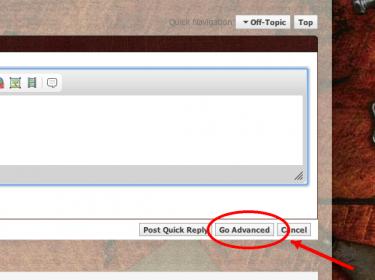
1. Click "Go Advanced" at the bottom of the posting box located at the bottom of this page.
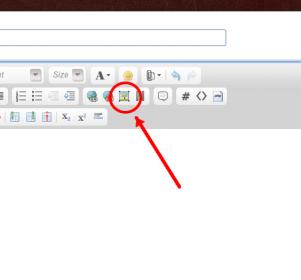
2. Click the image icon in the posting box.
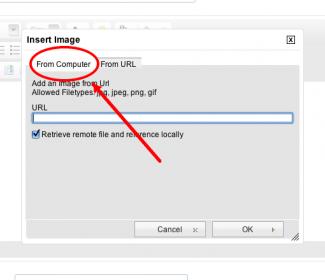
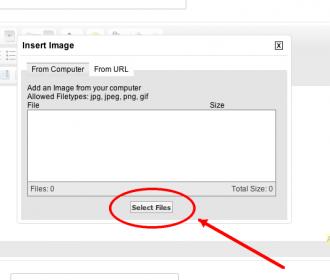
3. Click the "From Computer" text in the resulting box.
4. Click the "Select Files" button.
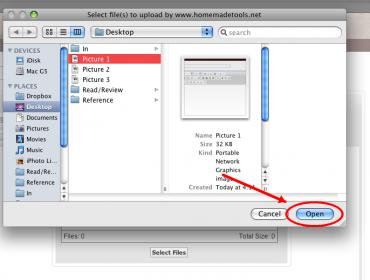
5. Navigate to the correct image file on your computer, and then click the "Open" button (this may look a little different on your computer). You may choose multiple files if you like.
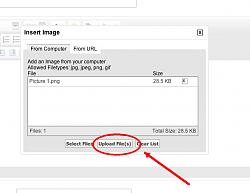
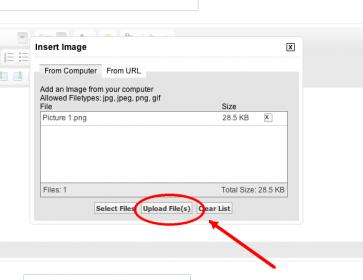
6. Click the "Upload File(s)" button.


 Reply With Quote

Bookmarks