Free 186 More Best Homemade Tools eBook:  
New: 300+ fresh build posts/day from 275 forums → BuildThreads.com

User Tag List

Results 1 to 4 of 4

Thread: A Portable Password Vault

  1. #1
    Supporting Member rgsparber's Avatar
    Join Date
    Nov 2012
    Location
    Phoenix, AZ
    Posts
    1,392
    Thanks
    802
    Thanked 3,091 Times in 741 Posts

    rgsparber's Tools

    A Portable Password Vault

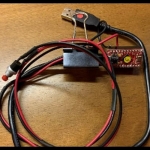
    I try to be security-minded, so my passwords are long and filled with every type of character. When I must manually enter such a password, it takes a lot of effort, and I often screw up a character, so I must start over. My solution was to build the Portable Password Vault. It consists of a Sparkfun Pro Micro, a pushbutton, and a short USB cable.

    To use the Vault, I plug it into the PC via a USB port. Then I click on the login window and push the button. My login appears. After clicking Next, I push the button again. This time I get the password. Unplug the Portable Password Vault. No fuss and no frustration.

    If you are interested, please, click here.


    Your comments are welcome. All of us are smarter than any one of us.


    Thanks,

    Rick

    Rick

  2. The Following 4 Users Say Thank You to rgsparber For This Useful Post:

    carloski (Nov 18, 2021), Jon (Nov 11, 2021), thevillageinn (Nov 13, 2021), Toolmaker51 (Nov 9, 2021)

  3. #2
    Content Editor
    Supporting Member
    DIYer's Avatar
    Join Date
    Aug 2013
    Posts
    3,049
    Thanks
    848
    Thanked 2,969 Times in 2,523 Posts


    Thanks rgsparber! We've added your Portable Password Vault to our Electronics category,
    as well as to your builder page: rgsparber's Homemade Tools. Your receipt:


    New: BuildThreads.com - 300+ build posts/day (with photos)

  4. #3
    Supporting Member tonyfoale's Avatar
    Join Date
    Nov 2016
    Location
    Spain
    Posts
    1,819
    Thanks
    834
    Thanked 3,235 Times in 909 Posts

    tonyfoale's Tools
    Nice one Rick. I do something similar for 6 sign-ins. Each is arranged in an 6 x 2 array. One button selects the array index and then the other button inserts the name and password in a similar manner to yours.

  5. The Following User Says Thank You to tonyfoale For This Useful Post:

    carloski (Nov 18, 2021)

  6. #4
    Supporting Member rgsparber's Avatar
    Join Date
    Nov 2012
    Location
    Phoenix, AZ
    Posts
    1,392
    Thanks
    802
    Thanked 3,091 Times in 741 Posts

    rgsparber's Tools
    Quote Originally Posted by tonyfoale View Post
    Nice one Rick. I do something similar for 6 sign-ins. Each is arranged in an 6 x 2 array. One button selects the array index and then the other button inserts the name and password in a similar manner to yours.
    As I use the device, I have grown to appreciate the importance of using a partial password for security reasons. The last few characters can be thought of as a key and can be the same for all stored passwords. In this way, if someone does steal the device, they still can't use it.

    The next iteration of my design can have any number of accounts as long as the total number of characters, including an end of field delimiter, is less than 1024. It will be updated via a Javascript. I'm not doing the software this time. A past student of mine who is a professional programmer has volunteered.

    Rick


    2,500+ Tool Plans
    Rick

Thread Information

Users Browsing this Thread

There are currently 1 users browsing this thread. (0 members and 1 guests)

Tags for this Thread

Bookmarks

Posting Permissions

  • You may not post new threads
  • You may not post replies
  • You may not post attachments
  • You may not edit your posts
  •