Free 186 More Best Homemade Tools eBook:  
New: 300+ fresh build posts/day from 275 forums → BuildThreads.com

User Tag List

Results 1 to 4 of 4

Thread: The quickest way to scan books and/or documents.

  1. #1
    Supporting Member tonyfoale's Avatar
    Join Date
    Nov 2016
    Location
    Spain
    Posts
    1,821
    Thanks
    834
    Thanked 3,238 Times in 910 Posts

    tonyfoale's Tools

    The quickest way to scan books and/or documents.

    Scanning documents in general and books in particular with consumer level scanners is slow and tedious.
    There is a better way. It is called a camera.
    Many of us need to copy books from time to time. Maybe we have been lent an out of print old machining book, or maybe a book in poor condition that we would like to digitally enhance to make reading easier. All you need is a copy stand and a camera.

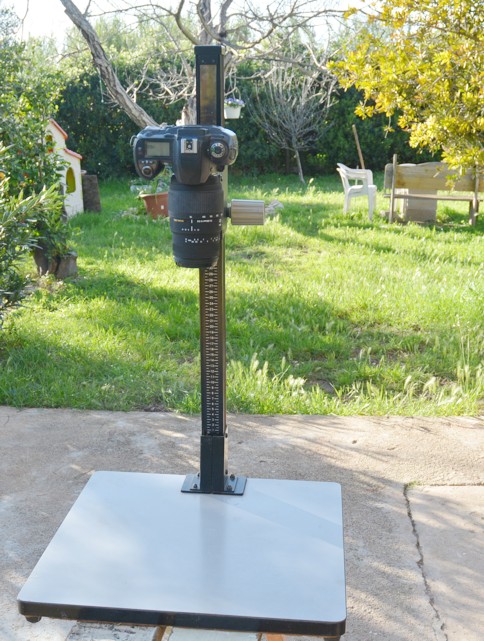
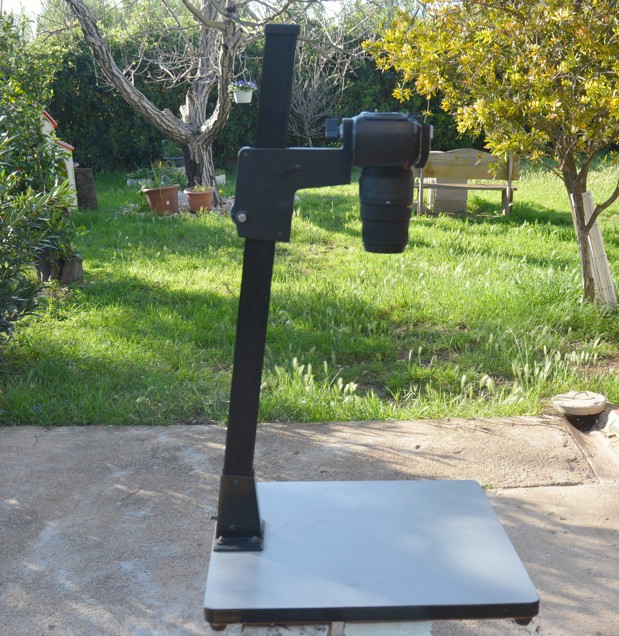
    I had an old enlarger from film processing days. I removed the light and lens assembly and found that it was held in place by the standard 1/4" x 20 bolt used on camera equipment. Perfect for attaching a camera. The enlarger stand had an upright with a moveable carrier which made it even more suitable.
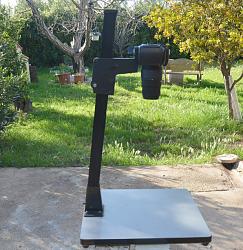
    The quickest way to scan books and/or documents.-copystand02.jpg The quickest way to scan books and/or documents.-copystand.jpg Click on images for full size.

    The camera height and zoom are adjusted to suit the size of the document or book. Then it is just a matter of turning pages and clicking, it really is fast. It is even better if you use a remote release button either wireless or with cable, because then you do not even have to look up from the book to operate the camera.

    Of course not everybody has an old enlarger laying around, but anyone on this forum be they wood workers or metal workers should be capable of making an equivalent. It is not really necessary to have a height adjustment, with a fixed height you can use the zoom to frame the document. I also find it useful to mark the outline of the book on the base, so that it is fast to replace it if you have to remove it from the base. With a book I generally copy the RH pages first, and then rearrange the book and do all the LH pages. I also set a stop so that the book is restrained to around 100/110 degrees of opening rather than bend the book all the way to 180 deg. This helps keep the pages flat. When copying a book I generally do to halfway from the front and then the second half from the back cover, this technique also helps keep the pages flat.

  2. The Following 10 Users Say Thank You to tonyfoale For This Useful Post:

    baja (Apr 14, 2020), clydeman (Dec 26, 2025), emu roo (Dec 26, 2025), garage nut (Apr 13, 2020), hansgoudzwaard (Apr 12, 2020), Jon (Apr 17, 2020), Marnat3 (Apr 13, 2020), rgsparber (Apr 17, 2020), rlm98253 (Apr 13, 2020), Tonyg (Apr 13, 2020)

  3. #2
    Content Editor
    Supporting Member
    DIYer's Avatar
    Join Date
    Aug 2013
    Posts
    3,049
    Thanks
    848
    Thanked 2,974 Times in 2,528 Posts


    Thanks tonyfoale! We've added your Document Scanning Setup to our Photography and Videography category,
    as well as to your builder page: tonyfoale's Homemade Tools. Your receipt:


    New: BuildThreads.com - 300+ build posts/day (with photos)

  4. The Following User Says Thank You to DIYer For This Useful Post:

    emu roo (Dec 26, 2025)

  5. #3
    Supporting Member VinnieL's Avatar
    Join Date
    Feb 2018
    Posts
    281
    Thanks
    30
    Thanked 147 Times in 112 Posts
    In my days as a Crime Scene Tech we referred to those as a "copy stand" on which a 35mm, 4x5 or Polaroid MP-4 camera could be mounted. I took photos of a lot of fingerprints in that manner.

  6. The Following 2 Users Say Thank You to VinnieL For This Useful Post:

    emu roo (Dec 26, 2025), tonyfoale (Apr 15, 2020)

  7. #4
    Supporting Member Hoosiersmoker's Avatar
    Join Date
    Mar 2018
    Posts
    2,320
    Thanks
    494
    Thanked 594 Times in 462 Posts

    Hoosiersmoker's Tools
    Wow! Blast from the past! I had an old copy stand I bought from my high school when they were updating their photo lab. I think I gave $10 for it (I also bought a B&W enlarger, processing cans and pans and a glossy print dryer!). My parents were avid camera bugs and had hundreds of old photos with descriptions on the backs of most of them and I wanted to make sure they were preserved for posterity. I bought a new digital camera, which at the time was quite expensive, and a bunch of memory cards for it. I dug out the copy stand and cleaned it up and started in copying all of the photos. I think it took me a couple of months of afternoons, evenings and weekends but I eventually copied them all and then transferred them to CDs, which I still have, each with a file name the same as the information that was written on the back of the photos. I have actually accessed them several times for family members.


    2,500+ Tool Plans
    "The man who views the world at 50 the same as he did at 20 has wasted 30 years of his life."
    - Muhammad Ali

  8. The Following 2 Users Say Thank You to Hoosiersmoker For This Useful Post:

    emu roo (Dec 26, 2025), tonyfoale (May 21, 2024)

Thread Information

Users Browsing this Thread

There are currently 1 users browsing this thread. (0 members and 1 guests)

Tags for this Thread

Bookmarks

Posting Permissions

  • You may not post new threads
  • You may not post replies
  • You may not post attachments
  • You may not edit your posts
  •