
 LinkBack URL
 About LinkBacks

In firefox, select Tool/options/ (a new tab will popup) then select Privacy & security, then scroll down to Logins & passwords, select "Ask to save logins and passwords for websites", also "use a master password". You need to set that password up. Makes it nice if you ever forget a site password you can have it show it to you after you key in the master password.Originally Posted by Ralphxyz

As long as you don't log out, the next time you visit the site, it logs you in. For your financial banking and such, their security requires login as they log you out for non use.
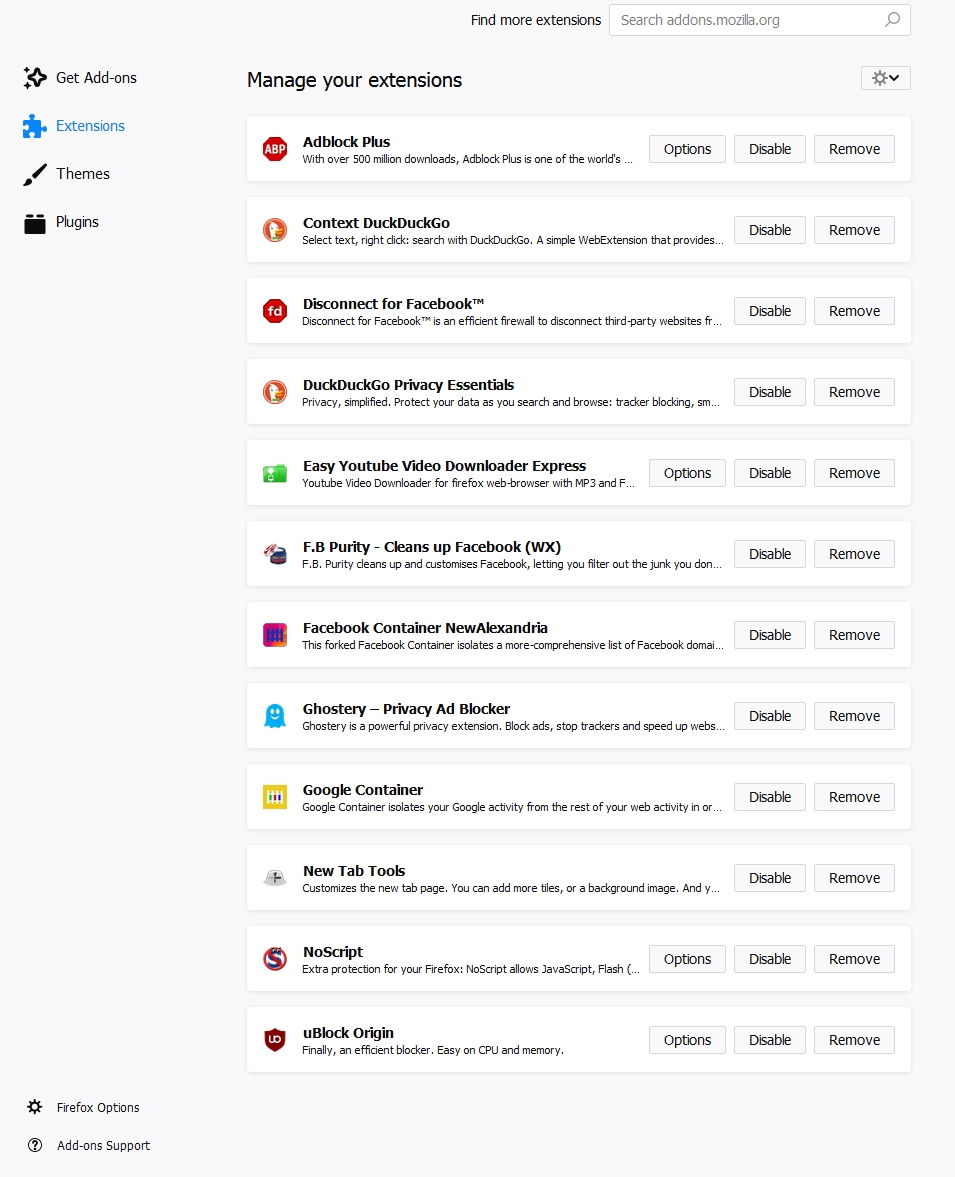
As Marv Klotz indicates, install extension Ublock origin. I also have No Script, and also use duckduckgo for a search engine, as they don't track me. However, I don't know how they make money to support it. There are also 'containers', I've installed google container, so it locks their eyes from other cookies and such. If you do facebook there is a container for that, as well Disconnect for facebook, all to prevent them from looking at other cookies, as well sites that snoop for these. I've installed fbpurity (from fbpurity.com) which allows you to kill all the FB adverts and other annoying popups.
A screen shot of add-ons:


 Reply With Quote

Bookmarks