Free 186 More Best Homemade Tools eBook:  
New: 300+ fresh build posts/day from 275 forums → BuildThreads.com

User Tag List

Page 1 of 3 1 2 3 LastLast
Results 1 to 10 of 26

Thread: Digital or dial indicator on height gauge

Hybrid View

  1. #1
    Supporting Member tonyfoale's Avatar
    Join Date
    Nov 2016
    Location
    Spain
    Posts
    1,819
    Thanks
    834
    Thanked 3,235 Times in 909 Posts

    tonyfoale's Tools

    Digital or dial indicator on height gauge

    metric_taper started a thread http://www.homemadetools.net/forum/s...-holding-60204 over on "Tools in progress" to which I added some pix. DIYer asked if I was going to make a separate post. I wasn't planning it but then I had a job for it this afternoon and made a video whilst measuring.
    So for completeness here are the original photos and the video.

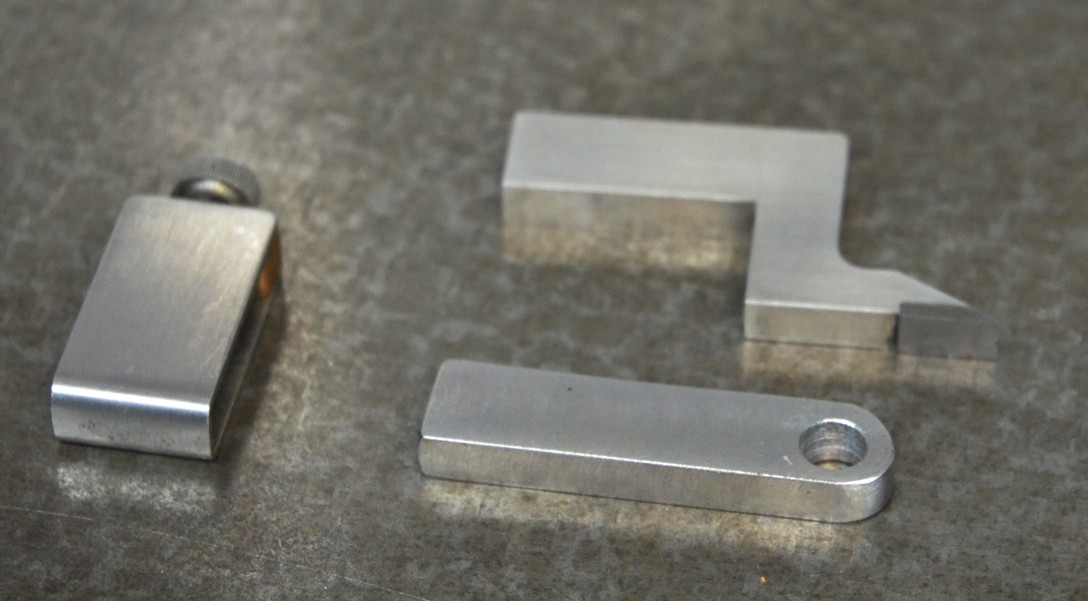
    Digital or dial indicator on height gauge-gauge-height-01.jpg
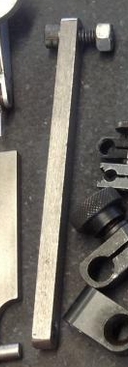
    This shows a simple rectangular piece to bolt to the lug on the back of the digital/dial gauge. This get clamped in place of the scriber piece of a vernier height gauge.

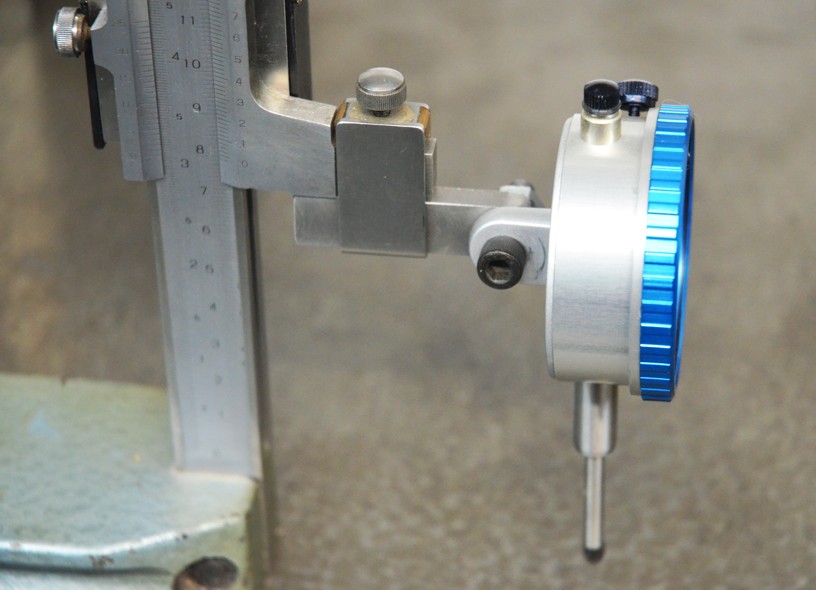
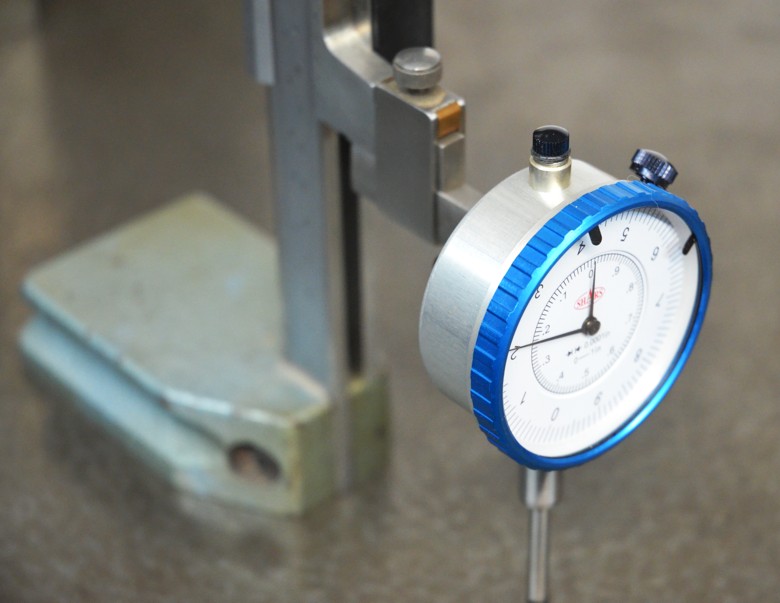
    Digital or dial indicator on height gauge-gauge-height-02.jpg Digital or dial indicator on height gauge-gauge-height-03.jpg
    A dial gauge fitted ready for use.

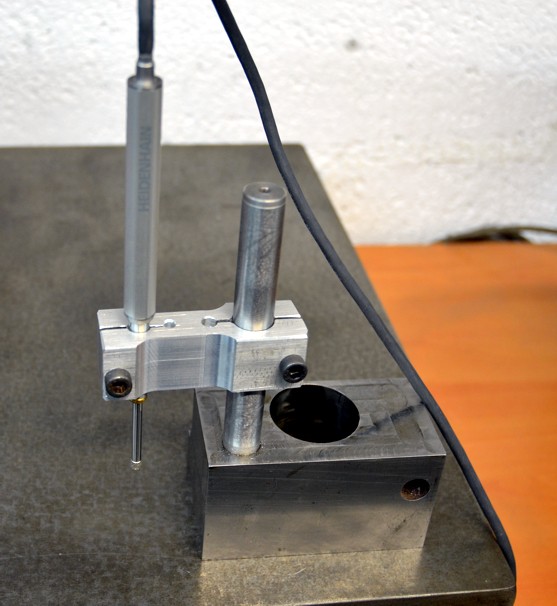
    Digital or dial indicator on height gauge-linear-encoder.jpg
    Here is another way to hold an indicator, useful when there is no lug as with this linear encoder.

    And now the video. Note the error, at one point I call out 10.2mm which should be 1.02mm.


  2. The Following 5 Users Say Thank You to tonyfoale For This Useful Post:

    C-Bag (Apr 26, 2017), LMMasterMariner (May 1, 2017), metric_taper (Apr 19, 2017), olderdan (Apr 18, 2017), rossbotics (May 5, 2018)

  3. #2
    Supporting Member metric_taper's Avatar
    Join Date
    Mar 2017
    Location
    Marion, Iowa
    Posts
    760
    Thanks
    281
    Thanked 410 Times in 266 Posts

    metric_taper's Tools
    Thank you, your video of making depth measurements, will be handy. I don't know how many times I've had to figure out relative measurements. Doing this, they can be drawn to an absolute coordinate system, with must faster capture time.
    Most of the job of making a repair part is measuring the sample. This technique had not occurred to me.

    I see a cable with 4 wires coming out of the indicator. Did you have any luck with an oscilloscope figuring out how to decode the data and clock?
    Steve
    Last edited by metric_taper; Apr 19, 2017 at 09:43 PM.

  4. #3
    Supporting Member tonyfoale's Avatar
    Join Date
    Nov 2016
    Location
    Spain
    Posts
    1,819
    Thanks
    834
    Thanked 3,235 Times in 909 Posts

    tonyfoale's Tools
    Quote Originally Posted by metric_taper View Post
    Thank you, your video of making depth measurements, will be handy. I don't know how many times I've had to figure out relative measurements. Doing this, they can be drawn to an absolute coordinate system, with must faster capture time.
    Most of the job of making a repair part is measuring the sample. This technique had not occurred to me.
    Steve,
    The zero setting is the thing that I like most about digital measuring instruments.

    Quote Originally Posted by metric_taper View Post
    I see a cable with 4 wires coming out of the indicator. Did you have any luck with an oscilloscope figuring out how to decode the data and clock?
    Yes. Firstly I tried with an analogue CRO but that just didn't show enough detail. So then I tried my Picoscope which is a box between what you are measuring and a PC. In effect a digital scope with the extra processing power of a PC. The Picoscope is a great tool and is much cheaper than a quality standalone scope. With that it was easy enough to interpret the coding. As you know I am waiting for a plug in cable to arrive so that I can easily plug into digital calipers then I can avoid having to solder on a breakout cable.
    I'll make a post here when I have sorted out the decoding of my calipers. I'll post the decoding software code here as well.

  5. #4
    Supporting Member metric_taper's Avatar
    Join Date
    Mar 2017
    Location
    Marion, Iowa
    Posts
    760
    Thanks
    281
    Thanked 410 Times in 266 Posts

    metric_taper's Tools
    Quote Originally Posted by tonyfoale View Post
    Steve,
    The zero setting is the thing that I like most about digital measuring instruments.


    Yes. Firstly I tried with an analogue CRO but that just didn't show enough detail. So then I tried my Picoscope which is a box between what you are measuring and a PC. In effect a digital scope with the extra processing power of a PC. The Picoscope is a great tool and is much cheaper than a quality standalone scope. With that it was easy enough to interpret the coding. As you know I am waiting for a plug in cable to arrive so that I can easily plug into digital calipers then I can avoid having to solder on a breakout cable.
    I'll make a post here when I have sorted out the decoding of my calipers. I'll post the decoding software code here as well.
    Tony: I found this on eBay
    Win-2 RS232 USB Interface Cables for Electronic Calipers & Scales

    I don't see the seller saying which version of win it runs on. It's a RS232 adapter. The end connector looks to be 4 pin, but who knows what it fits. I've tried a google search for WIN-2, with model number RS232, no luck.

    Then this:
    SPC/USB data cable for 100-700 iGaging absolute calipers, DRO | eBay


    This looks like the best, but again unknown instrument protocol, and win version supported. It has a foot switch to trigger a measurement.
    Interface Kit For Digital Measuring Caliper Electronic | eBay

  6. #5
    Supporting Member tonyfoale's Avatar
    Join Date
    Nov 2016
    Location
    Spain
    Posts
    1,819
    Thanks
    834
    Thanked 3,235 Times in 909 Posts

    tonyfoale's Tools
    Steve,

    Your searches turned up more than mine. This is all I found and is what I bought. I don't seem to very good at composing good search phrases.

    Data Cable for Chinese Digital Calipers and Linear Scales Custom DRO Project NEW | eBay

    However, I'd be wary of buying any of those others without more detail on which data formats they work with. I think that the igaging will only be compatible with igaging stuff. In addition since I got the cable I have found that not only does the data format vary from instrument to instrument but so does the socket detail. The cable I got had been moulded a tad too large so it needed a bit of shaving to fit the calipers and digital indicator with "supposedly" a matching socket, but it was too narrow for two other calipers that I tried it on. They have 4 contacts with the same spacing but without a touch of super-glue and tiny pieces of plastic you couldn't guarantee that the plug and socket contacts would stay aligned.
    i have a couple of applications for which I need to get measurements into a PC which is what had prompted my interest in this. To be realistic I don't need to pass data from all my calipers etc. to a PC and now that I have a nice linear encoder the incentive to play around has largely evaporated. Getting the encoder data into my software is very easy
    This afternoon I got my cam profile measuring thingy up and running with the new encoder and I couldn't be happier with how well it works. Generally measured cam data needs considerable filtering which loses real data not just noise. This need is driven because cam analysis needs getting the first 3 derivatives of the displacement and each differentiation step enhances the noise. With my new setup, the results only need 1/4 of the number of filtering passes that I had to do with manually derived data.
    Anyway when I get a moment I'll make a proper post about the system.

  7. #6
    Supporting Member metric_taper's Avatar
    Join Date
    Mar 2017
    Location
    Marion, Iowa
    Posts
    760
    Thanks
    281
    Thanked 410 Times in 266 Posts

    metric_taper's Tools
    Quote Originally Posted by tonyfoale View Post
    Steve,

    Your searches turned up more than mine. This is all I found and is what I bought. I don't seem to very good at composing good search phrases.

    Data Cable for Chinese Digital Calipers and Linear Scales Custom DRO Project NEW | eBay

    However, I'd be wary of buying any of those others without more detail on which data formats they work with. I think that the igaging will only be compatible with igaging stuff. In addition since I got the cable I have found that not only does the data format vary from instrument to instrument but so does the socket detail. The cable I got had been moulded a tad too large so it needed a bit of shaving to fit the calipers and digital indicator with "supposedly" a matching socket, but it was too narrow for two other calipers that I tried it on. They have 4 contacts with the same spacing but without a touch of super-glue and tiny pieces of plastic you couldn't guarantee that the plug and socket contacts would stay aligned.
    i have a couple of applications for which I need to get measurements into a PC which is what had prompted my interest in this. To be realistic I don't need to pass data from all my calipers etc. to a PC and now that I have a nice linear encoder the incentive to play around has largely evaporated. Getting the encoder data into my software is very easy
    This afternoon I got my cam profile measuring thingy up and running with the new encoder and I couldn't be happier with how well it works. Generally measured cam data needs considerable filtering which loses real data not just noise. This need is driven because cam analysis needs getting the first 3 derivatives of the displacement and each differentiation step enhances the noise. With my new setup, the results only need 1/4 of the number of filtering passes that I had to do with manually derived data.
    Anyway when I get a moment I'll make a proper post about the system.
    I got lucky with the first search, as the eBay suggestions came up with the other examples.
    I'm in 100% agreement with compatibility. It's too bad this is not a standard (like RS232), then you could trust an off the shelf data reader. And the iGaging gave me the exact same opinion, once I saw another add for the reader with the caliper.

  8. #7
    Supporting Member C-Bag's Avatar
    Join Date
    Aug 2015
    Location
    California, central coast
    Posts
    720
    Thanks
    689
    Thanked 923 Times in 480 Posts

    C-Bag's Tools
    I glanced your original post Tony and was struck with how simple but perfect a solution. I was in a hurry at the time but it hung around in the back of my mind. I thought it was because no matter what I'm trying to mount on my old height gage I can't seem to find the setup for a lugged DI.

    Then today I was doing some measuring and bang, there it was.

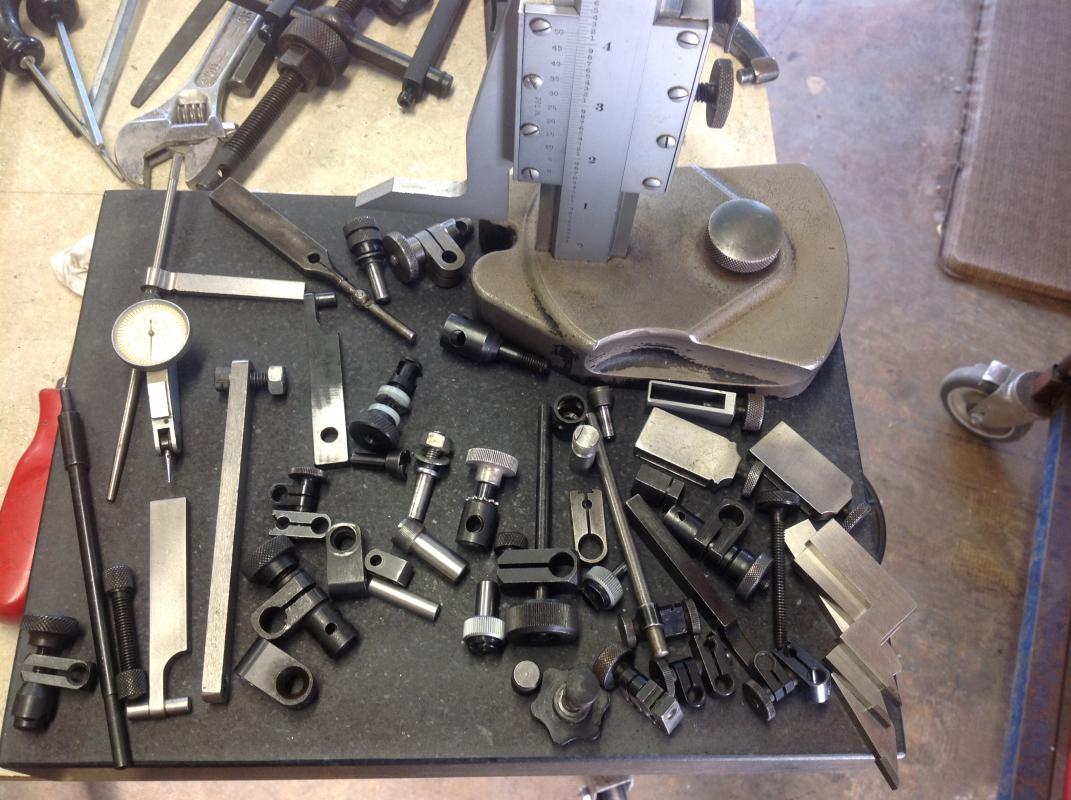
    A year or two ago I decided to go on an eBay hunt for a height gage. I noticed nobody was hot for the old vernier's so I started watching close. Finally an old well cared for Starrett 14" came up with a veritable slew of attachments plus an old B&S .0005 DI w/buy it now of $110! I thought surely in all that I could mount ANYTHING, wrong. I still couldn't seem to work the lugged DI, until today. Now all the sudden that long piece close to the middle made sense finally. Makes me crazy I'd shifted that thing out of the way several times trying to solve that puzzle.

    Thanks for lighting this dim bulb.Digital or dial indicator on height gauge-image.jpg

  9. The Following User Says Thank You to C-Bag For This Useful Post:

    Paul Jones (Apr 27, 2017)

  10. #8
    Supporting Member metric_taper's Avatar
    Join Date
    Mar 2017
    Location
    Marion, Iowa
    Posts
    760
    Thanks
    281
    Thanked 410 Times in 266 Posts

    metric_taper's Tools
    C-Bag, is this the attachment your referencing?
    Digital or dial indicator on height gauge-c-bag-photo.jpg

  11. #9
    Supporting Member metric_taper's Avatar
    Join Date
    Mar 2017
    Location
    Marion, Iowa
    Posts
    760
    Thanks
    281
    Thanked 410 Times in 266 Posts

    metric_taper's Tools

    Random search found these

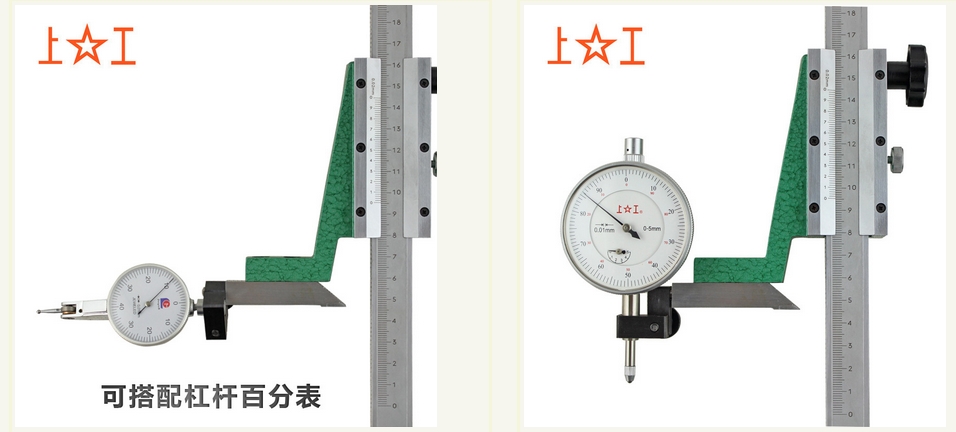
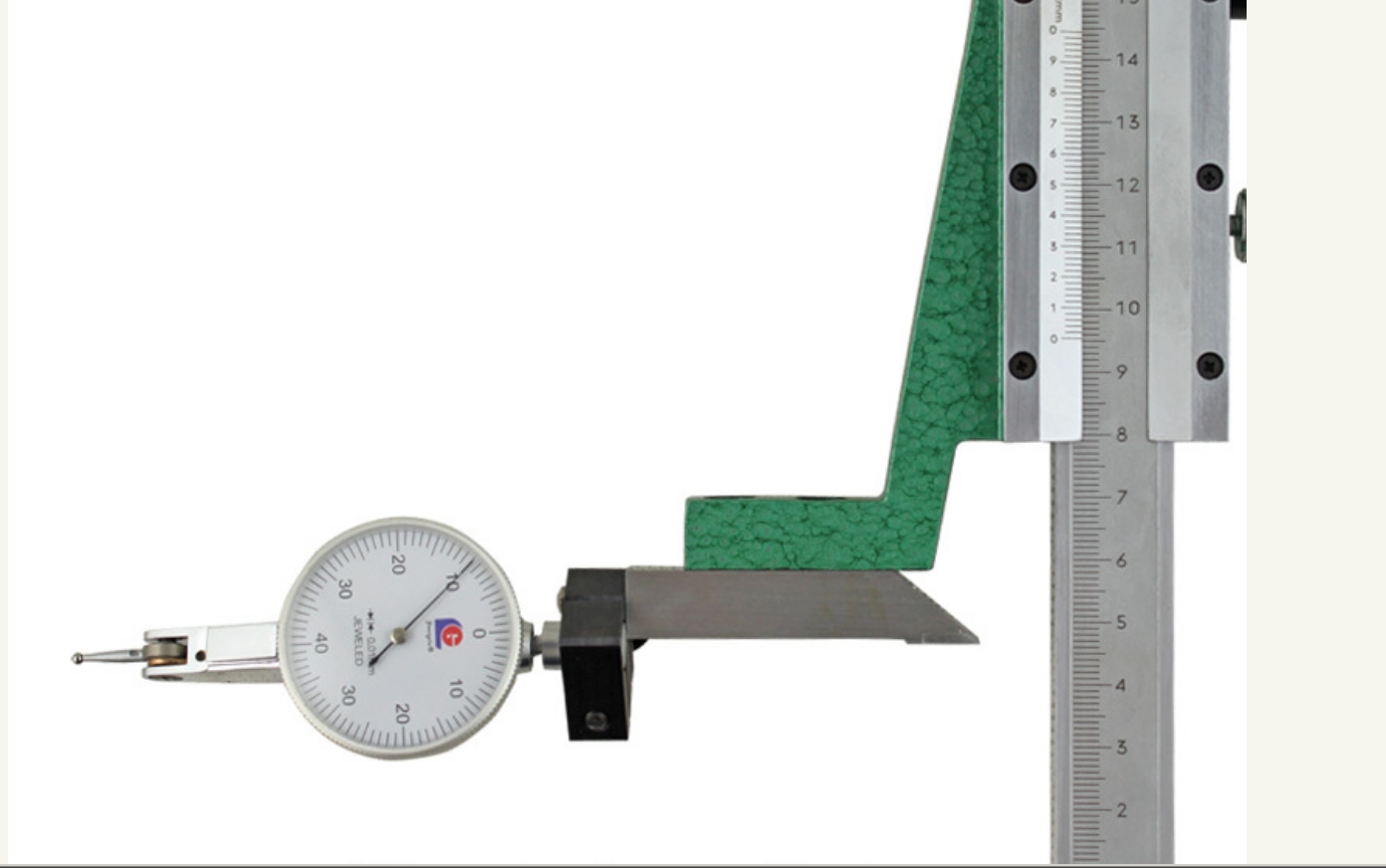
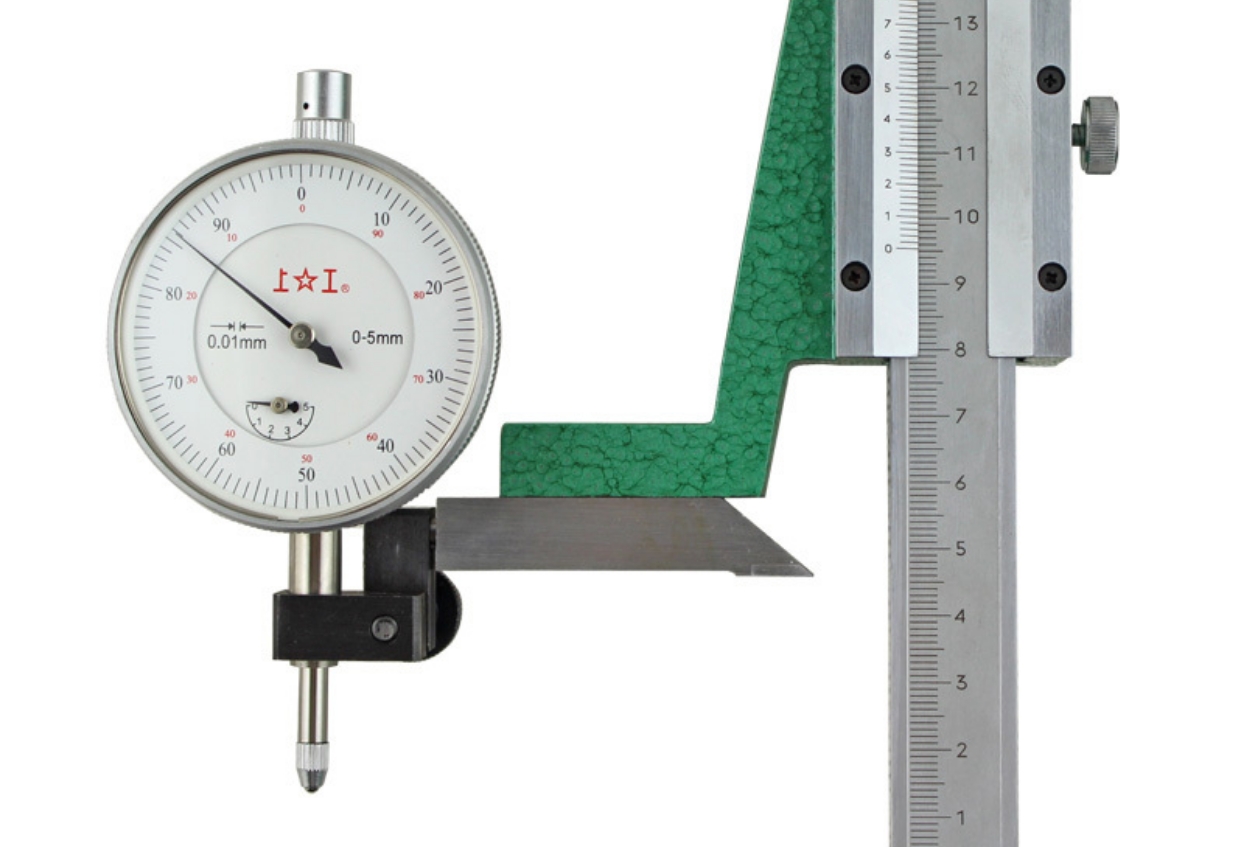
    So I was searching for surface gauge info, and found this photo of a height gauge attachment;
    Digital or dial indicator on height gauge-dti-di-height-gage-mount.jpg

    I could not find any reference to this other then the photo credit of Aliexpress.com, and I could not find any industrial tools there.
    Digital or dial indicator on height gauge-di-height-gage-mount.jpgDigital or dial indicator on height gauge-dti-height-gage-mount.jpg

    Seems simple enough to copy. A side view would be handy.

  12. The Following User Says Thank You to metric_taper For This Useful Post:

    Paul Jones (Apr 27, 2017)

  13. #10
    Supporting Member C-Bag's Avatar
    Join Date
    Aug 2015
    Location
    California, central coast
    Posts
    720
    Thanks
    689
    Thanked 923 Times in 480 Posts

    C-Bag's Tools
    Quote Originally Posted by metric_taper View Post
    So I was searching for surface gauge info, and found this photo of a height gauge attachment;
    Click image for larger version. 

Name:	DTI and DI height gage mount.jpg 
Views:	1048 
Size:	138.0 KB 
ID:	17626

    I could not find any reference to this other then the photo credit of Aliexpress.com, and I could not find any industrial tools there.
    Click image for larger version. 

Name:	DI height gage mount.jpg 
Views:	1729 
Size:	262.6 KB 
ID:	17627Click image for larger version. 

Name:	DTI height gage mount.jpg 
Views:	992 
Size:	202.2 KB 
ID:	17628

    Seems simple enough to copy. A side view would be handy.
    At first glance, maybe. But look close at your DI's. Grabbing it where the plunger is, is not that great an idea and the cap on the other side. What do you do with that? Personally the attachment Tony showed and obviously the guy who had my old height gage knew what was up an is truly simple, IF you have those kinds of clamps that go over the probe and the attachment, which luckily came with my gage. It can also be rotated 90deg so far it's been just what I needed. It just kills me it was under my nose all along. For me it's been hard to find how some of these attachments work as they aren't as self evident as I thought. So far I've not found a comprehensive demo of how they are all used.

  14. The Following User Says Thank You to C-Bag For This Useful Post:

    Paul Jones (Apr 27, 2017)

Thread Information

Users Browsing this Thread

There are currently 1 users browsing this thread. (0 members and 1 guests)

Tags for this Thread

Bookmarks

Posting Permissions

  • You may not post new threads
  • You may not post replies
  • You may not post attachments
  • You may not edit your posts
  •