Free 186 More Best Homemade Tools eBook:  
New: 300+ fresh build posts/day from 275 forums → BuildThreads.com

User Tag List

Results 1 to 10 of 34

Thread: Surface plate height gauge adapter for dial indicator holding

Hybrid View

  1. #1
    Supporting Member metric_taper's Avatar
    Join Date
    Mar 2017
    Location
    Marion, Iowa
    Posts
    760
    Thanks
    281
    Thanked 410 Times in 266 Posts

    metric_taper's Tools
    Quote Originally Posted by tonyfoale View Post
    BTW cables to plug straight in to the data ports are not common, few sellers have them, and many people just solder directly on to the terminals.
    Tony, I found the same issue:
    I tried several years ago to get one for the Mititoyo vertical mill quill digital indicator, and had zero luck finding a cable that could interface to some affordable SPC reader. I had only tried eBay. I was hoping there would have been an ISA card for the PC (now a PCI or USB card would be wanted). I did find a web site that discouraged me, with the lack of any data standard for the many digital scales out there (as you stated). If you can't get it into a data stream and captured in the PC, makes it tough to go the cheep route, as I don't want to fit the mill with ballscrews, and felt this would provide a feedback means of a low cost CNC.

    Yes I could get some micro controller, but then I'd be spending many hours horsing around with software code, and that's not really how I want to spend my time these days.

    Even finding a quadrature decoder/counter off the shelf requires a micro controller to read and transfer the data.

    I'm whittling metal with out the CNC help, and at this moment, I have no project held up for this.

    Steve

  2. #2
    Supporting Member tonyfoale's Avatar
    Join Date
    Nov 2016
    Location
    Spain
    Posts
    1,821
    Thanks
    834
    Thanked 3,238 Times in 910 Posts

    tonyfoale's Tools
    Quote Originally Posted by metric_taper View Post
    Tony, I found the same issue:
    I tried several years ago to get one for the Mititoyo vertical mill quill digital indicator, and had zero luck finding a cable that could interface to some affordable SPC reader. I had only tried eBay.
    this the only offering I have been able to find worldwide. ebay.com 252491415529

    Quote Originally Posted by metric_taper View Post
    Yes I could get some micro controller, but then I'd be spending many hours horsing around with software code, and that's not really how I want to spend my time these days.
    i can understand that, but there is a lot of info on the net, as someone has worked out how to read each format. many use an Arduino as the interface twix PC and instrument. I find it amazing that most manufacturers fit the data port but provide no help with using it. A lost marketing opportunity I guess.

    Quote Originally Posted by metric_taper View Post
    Even finding a quadrature decoder/counter off the shelf requires a micro controller to read and transfer the data.
    That is so simple it is almost trivial. When I get my new encoder I intend to post something here including the Aduino code (Sketch as they call it)

  3. #3
    Supporting Member metric_taper's Avatar
    Join Date
    Mar 2017
    Location
    Marion, Iowa
    Posts
    760
    Thanks
    281
    Thanked 410 Times in 266 Posts

    metric_taper's Tools
    Quote Originally Posted by tonyfoale View Post
    this the only offering I have been able to find worldwide. ebay.com 252491415529


    i can understand that, but there is a lot of info on the net, as someone has worked out how to read each format. many use an Arduino as the interface twix PC and instrument. I find it amazing that most manufacturers fit the data port but provide no help with using it. A lost marketing opportunity I guess.


    That is so simple it is almost trivial. When I get my new encoder I intend to post something here including the Aduino code (Sketch as they call it)
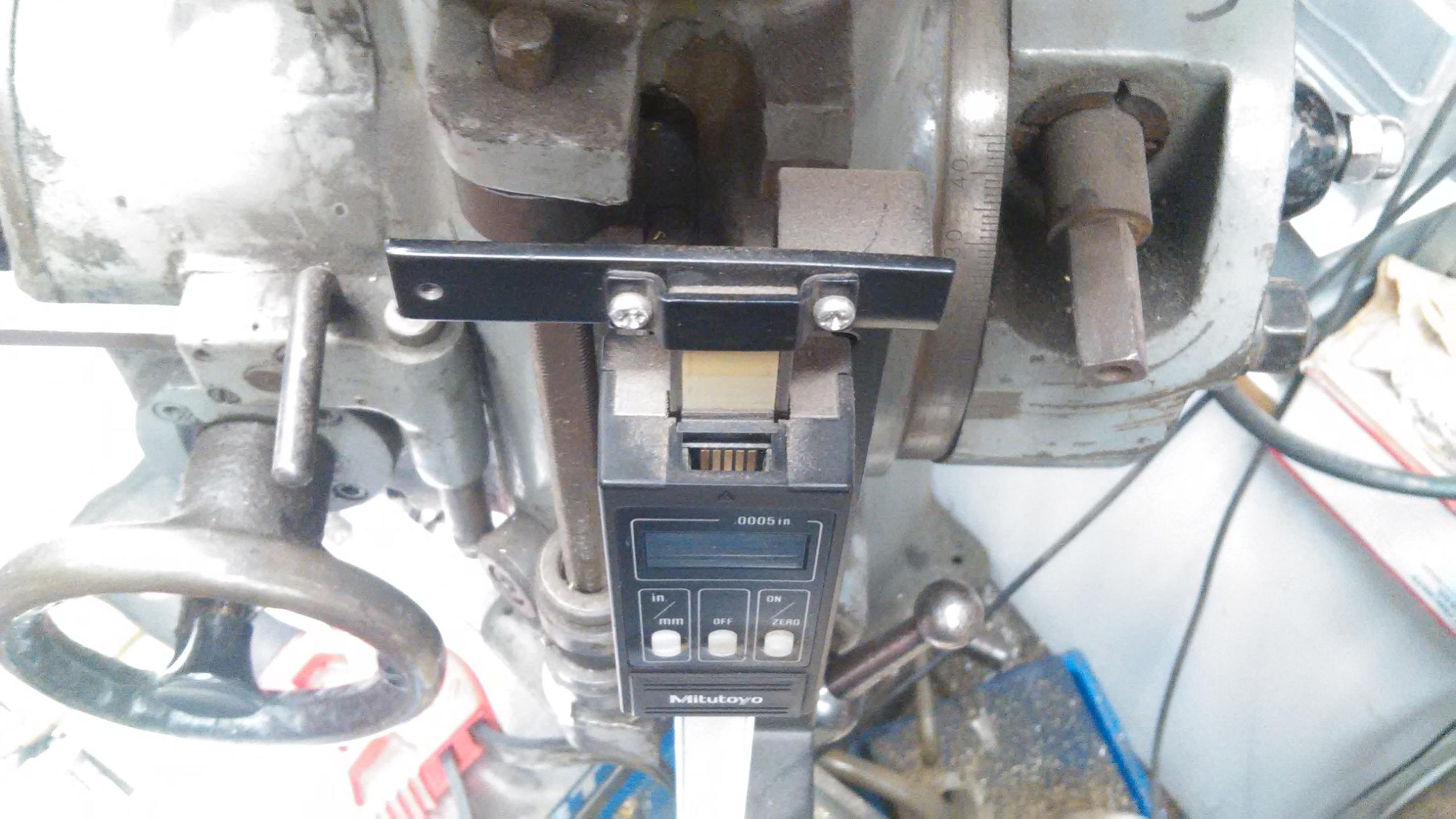
    The Mitutoyo, a 5 pin:
    Surface plate height gauge adapter for dial indicator holding-2017-04-17-indicator-cable-connector-003.jpg

    And
    eBay item number: 172578890127 but no detail photo, to determine if this will fit.
    And then there's bunches of cables at this site: Mitutoyo Spc Cable | Factory Brand Outlets
    It's a job to figure out which will work. And then you still need to reverse engr. the pinout for data and clock, and then write a bit banger to decode the data stream.
    I did that in my past life, it just is not something I want to do. If some simple PLC box with an interpreter language existed, that had 16+ I/O with quadrature decoders built in along with up/down counters, so you would not have to do interrupt driven code (did lots of that too), I could see working through to make some machine enhancement devices.

    I bet Mitutoyo, does not want anyone to de-crypt their SPC port, as they want to sell the hardware and software. But your right, why wouldn't the low end of China manufactures want to do this, other then they too can sell the reader hardware, as it's useful for a DRO.

    I have looked into the Arduino, but my interest in learning ANOTHER program language just does not 'titillate' me.

    Just this morn, I was looking at how to get Mach3 to work on a computer that does not have a printer port. So I go down the path of GRex or ncPod (learned this was the path to USB), and this opens an enormous chasm of how ignorant I am to PC hardware. And then reading posts from a few blogs, my mind gives up. I want something super simple, download the code, plug in the interface card to a USB port, hook up the servos, and encoders, and watch the machine move the desired amount.

    Then there's the CAD to learn, and how to build the G code from this. I have several dials that need to me made, so engraving with a 4th axis would be handy.
    We'll see if I ever get there.

  4. #4
    Supporting Member tonyfoale's Avatar
    Join Date
    Nov 2016
    Location
    Spain
    Posts
    1,821
    Thanks
    834
    Thanked 3,238 Times in 910 Posts

    tonyfoale's Tools
    Quote Originally Posted by metric_taper View Post
    The Mitutoyo, a 5 pin:
    i didn't know about the 5 pin o/p. I have some Mitutoyo instruments but they are 4 pin. The cable that I am getting is 4 pin and AFAIK all the chinese stuff is too. I know that, at least the 4 pin, Mitutoyo uses a query/response data format. i.e. Your display unit sends an update request to the device and then it sends you a data packet. The chinese scales send data packets continuously at regular intervals.

    Quote Originally Posted by metric_taper View Post
    If some simple PLC box with an interpreter language existed, that had 16+ I/O with quadrature decoders built in along with up/down counters, so you would not have to do interrupt driven code (did lots of that too), I could see working through to make some machine enhancement devices.
    the Arduino makes this stuff very, very easy. The extent of coding it for interrupts is a single command "ATTACHINTERRUPT(pin no., HIGH/LOW or CHANGING)"

    Quote Originally Posted by metric_taper View Post
    I bet Mitutoyo, does not want anyone to de-crypt their SPC port, as they want to sell the hardware and software. But your right, why wouldn't the low end of China manufactures want to do this, other then they too can sell the reader hardware, as it's useful for a DRO.
    I haven't done it, but others have decoded it and put details on the net, in some cases even with Arduino code.

    Quote Originally Posted by metric_taper View Post
    I have looked into the Arduino, but my interest in learning ANOTHER program language just does not 'titillate' me.
    It didn't appeal to me either, I have been writing code since 1960 and have had to go through several languages along the way. For that reason I was slow to look at the Arduino. I had been using LabJack (labjack.com) for my DAQ and interface needs, that is totally controlled under the PC code and so there was nothing extra to learn, but then I had an application which needed a standalone micro so I was forced to start playing with the Arduino. It is very easy to do quite complex stuff. It has its own IDE for code writing and micro programming through the USB port. The code is C like but you only have to learn a little of the C syntax to be up and running. I am now a convert and wish that I had done it earlier, it would have saved me a lot of time. I now have an application for which the Arduino is not suitable and I'm going to have to use a PI Rasberry. I know little about it but I am NOT looking forward to it, I think it is Linux based and I know nothing about that.

    Quote Originally Posted by metric_taper View Post
    Just this morn, I was looking at how to get Mach3 to work on a computer that does not have a printer port.
    Easy. Use ethernet instead. That's how I control my mill.

    Quote Originally Posted by metric_taper View Post
    I want something super simple, download the code, plug in the interface card to a USB port, hook up the servos, and encoders, and watch the machine move the desired amount.
    With the right hardware, and there is plenty of that around, it can be pretty much that simple. When I have enough time I was going to document my efforts in that direction and post here but it'll need to be long.

    Quote Originally Posted by metric_taper View Post
    Then there's the CAD to learn, and how to build the G code from this. I have several dials that need to me made, so engraving with a 4th axis would be handy.
    Yes I really should learn CAD but I believe that software should be easy to use and the fact that courses are commonplace to teach CAD is enough to indicate that ease of use for newbies is not a built in feature. So far I have managed by hand coding G-code and I have written some software for automatically producing G-code for some specific uses that I have.
    When I graduated, long before PC CAD, I was given a drawing office, so even though I knew how to draw, I had a team of draftsmen to do that for me. Then I had my own business before PC CAD came along and I designed on a drawing board. When PC CAD became available I had little need for drawings so there was no need to learn it. Now it would be useful to be able to use CAD occasionally, but nowhere near enough to warrant the time needed to learn it. Even daily CAD jockeys find some operations difficult to do, let alone an occasional geriatric user.
    A few years ago I was working with a famous race car designer on a project. He said that when he started out in the business, the conversation over the lunch table was about suspension geometry, roll centres and other performance related stuff. When CAD came along he said that the conversations had changed to "how do I draw this". For this project he ordered a huge drawing board so that he could layout full size prints of the car. he was a skilled CAD jockey himself but nothing replaced the full size version that you could pencil draw on.

  5. #5
    Supporting Member metric_taper's Avatar
    Join Date
    Mar 2017
    Location
    Marion, Iowa
    Posts
    760
    Thanks
    281
    Thanked 410 Times in 266 Posts

    metric_taper's Tools
    Tony:
    I need to research the Ethernet interface to Mach3, but the controllers all seem to want the printer port, I need to look further.

    I never liked the syntax of "C", but I did have to do collateral work on designs of others, amazingly, it never stayed in my head, unlike BASIC, FORTRAN, PL1, PASCAL and any number of Assembly mnemonics. But I'm believing the only low cost kits I see are Arduino based development. I also see many frustrated coders on blog sites trying to figure out where they went wrong, especially with quad encoder, as they are servicing this with interrupt vs having a peripheral counter.

    There was a CAD program a few weeks ago I downloaded "freeCAD", which was a frustration to work with. I too had the minions that did the draftting at work. I did learn AutoCAD, but it was mostly 2d type drawings. The one thing I liked about it, if a few years pass between uses, I could pick up, and start drawing without any effort.

    I did find a cheep DRO kit (yet to be installed on the drill press X-Y table and quill) to use a 4 pin interface. But I purchased the reader for that, which has a X-Y-Z LCD display. I don't think there was a way to get an external data stream. But my want was to be able to drill a matrix of holes automatically. Another wayside project.

    Looking at your casting of a 4 stroke intake, exhaust port, cylinder head geometry, and measuring flow, and computing flow rate improvement is a SERIOUS petro head hobby. I didn't see from your text, what DAS you had to do this. But clearly you are "in deep" with IP of engine design. Looks like you are working with a 'hemi' configuration.

    I didn't understand the shear tool, as it looks more like it's burnishing the work vs scraping. I'm missing something.

    Steve, lots more to read of your skills.

  6. #6
    Supporting Member tonyfoale's Avatar
    Join Date
    Nov 2016
    Location
    Spain
    Posts
    1,821
    Thanks
    834
    Thanked 3,238 Times in 910 Posts

    tonyfoale's Tools
    Quote Originally Posted by metric_taper View Post
    Tony:
    I need to research the Ethernet interface to Mach3, but the controllers all seem to want the printer port, I need to look further.
    Steve,
    I bought a Bridgeport mill which had been fitted from new with an Anilam control and driver system. Which was definitely old tech when I got it. It worked OK but the RS232 port and proprietry mini-tape recorder/reader refused all efforts at communication, which meant that I had to punch in the programme each time I wanted to use it. This got tiring real quick so I started to look around for a replacement controller which could be PC driven. I had perfectly good servos, motor drivers and glass slides which I wanted to keep. I also had duplicates of all that. Whilst i found stacks of systems out there they all seemed to be aimed at or included stepper motors and rotary encoders. Apart from the expense of replacing everything I had no intention of downgrading from the servos and linear slides. Finding a suitable controller was not easy but I ended up going for a Galil card with 4 axis. More costly than I was planning but top quality stuff and worked with Mach3 with a plug-in and ethernet. It also did the processing on the card rather than in the PC. Mach3 basically said "I want to here" and the Galil card worked out how to. the PI in PID was done on the card and the D was done within the original drivers. So it was a closed loop system with the card closing the loop with Mach3 working open loop just sending demands. On a Windows OS with all its quirks this is probably the best way to do it. Although I don't do Linux I would have gone to Linux CNC except that it was not compatible with the Galil. I have recently learnt that Galil now have some Linux support so I may revisit it.
    All this is a long way of saying how I used ethernet with Mach3.

    Quote Originally Posted by metric_taper View Post
    I never liked the syntax of "C", but I did have to do collateral work on designs of others, amazingly, it never stayed in my head, unlike BASIC, FORTRAN, PL1, PASCAL and any number of Assembly mnemonics. But I'm believing the only low cost kits I see are Arduino based development. I also see many frustrated coders on blog sites trying to figure out where they went wrong, especially with quad encoder, as they are servicing this with interrupt vs having a peripheral counter.
    i have never liked C syntax either. I started with Fortran IV, hand written fixed format coding sheets and punched cards. I avoided BASIC where possible, now I mostly use Delphi, which is object Pascal for Windows. I agree that a peripheral counter is preferable but as long as the frequency is not too high, interrupts do the job. A side effect of the uptake of the Arduino and other systems which provide easy ways to use micros is that a large proportion of users do not have much in the way of coding or other technical skills so you get a lot of frustrated coders as you observe. It is not an indication that it is difficult, in fact it is the reverse.

    Quote Originally Posted by metric_taper View Post
    Looking at your casting of a 4 stroke intake, exhaust port, cylinder head geometry, and measuring flow, and computing flow rate improvement is a SERIOUS petro head hobby. I didn't see from your text, what DAS you had to do this. But clearly you are "in deep" with IP of engine design. Looks like you are working with a 'hemi' configuration.
    I mostly use a LabJack for collecting data. The engines that get most of my attention are Aermacchi 4 strokes (HD sprints in American). In the early 1970s I raced them and when I started classic racing in my dotage I decided to race a replica of what I used to use.

    Quote Originally Posted by metric_taper View Post
    I didn't understand the shear tool, as it looks more like it's burnishing the work vs scraping. I'm missing something.
    The best I can offer by way of explanation, is to imagine the shear tool being dragged across a non-rotating work piece, I think that will show a shaping action. Shear tool is not my term and I don't like it because it causes confusion, but it is the accepted term for that type of tool.

Thread Information

Users Browsing this Thread

There are currently 1 users browsing this thread. (0 members and 1 guests)

Bookmarks

Posting Permissions

  • You may not post new threads
  • You may not post replies
  • You may not post attachments
  • You may not edit your posts
  •